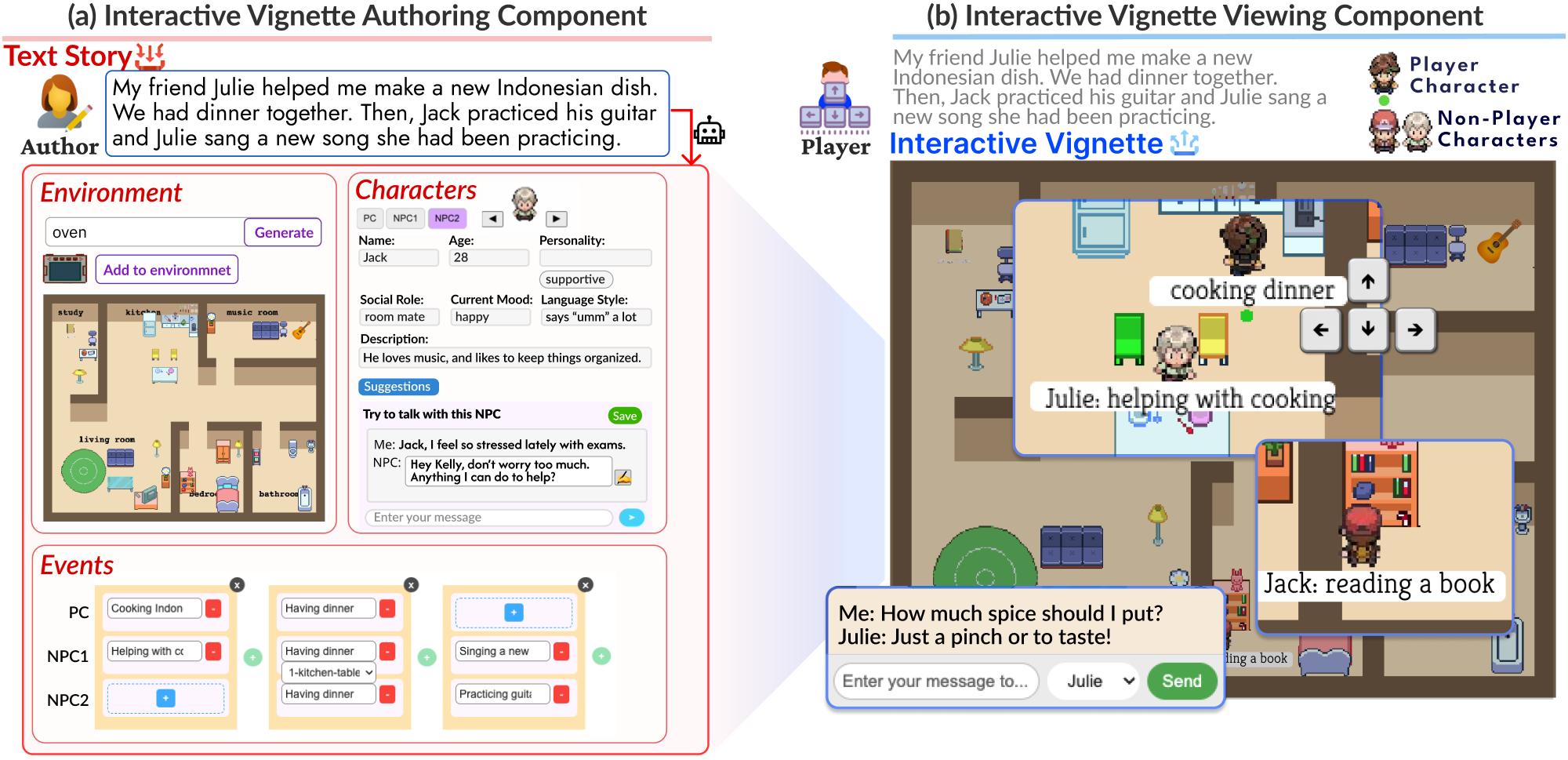
DiaryPlay assists everyday storytellers in creating interactive vignettes.
Abstract
An interactive vignette is a visual storytelling medium that lets the audience role-play a character and interact with non-player characters (NPCs) and the digital environment. Yet, the authoring complexity of interactive vignettes has obstructed their adoption in everyday storytelling, which builds on immediacy. We introduce DiaryPlay, an AI-assisted authoring system that generates interactive vignettes from text stories. The Authoring Component visually elicits three core elements (environment, characters, events) through automation and author refinement. The Viewing Component delivers an interactive story to the audience using an LLM-powered Controlled Divergence Module, which allows divergent player and NPC behaviors within the boundaries defined by the author’s intended story. A technical evaluation shows that the Controlled Divergence module generates believable NPC activities based on both character persona and storyline. A user study demonstrates that DiaryPlay enables low-effort authoring of interactive vignettes for everyday storytelling while providing engaging viewing experiences and conveying the core story message.
[DG1]
Enable a lightweight authoring process that matches the effort of everyday storytelling practices.
[DG2]
Capture and convey the author's key message in the everyday story.
[DG3]
Deliver an engaging viewing experience with situation-aware NPCs in a branching storyline.
DiaryPlay System Overview
The Interactive Vignette Authoring Component takes the author’s text story as input, extracts core elements (environment, characters, and events), and guides the author in refining them into structured interactive vignette elements. The Interactive Vignette Viewing Component enlivens NPCs and allows the player to control the PC, enabling an interactive narrative experience grounded in the authored storyline.
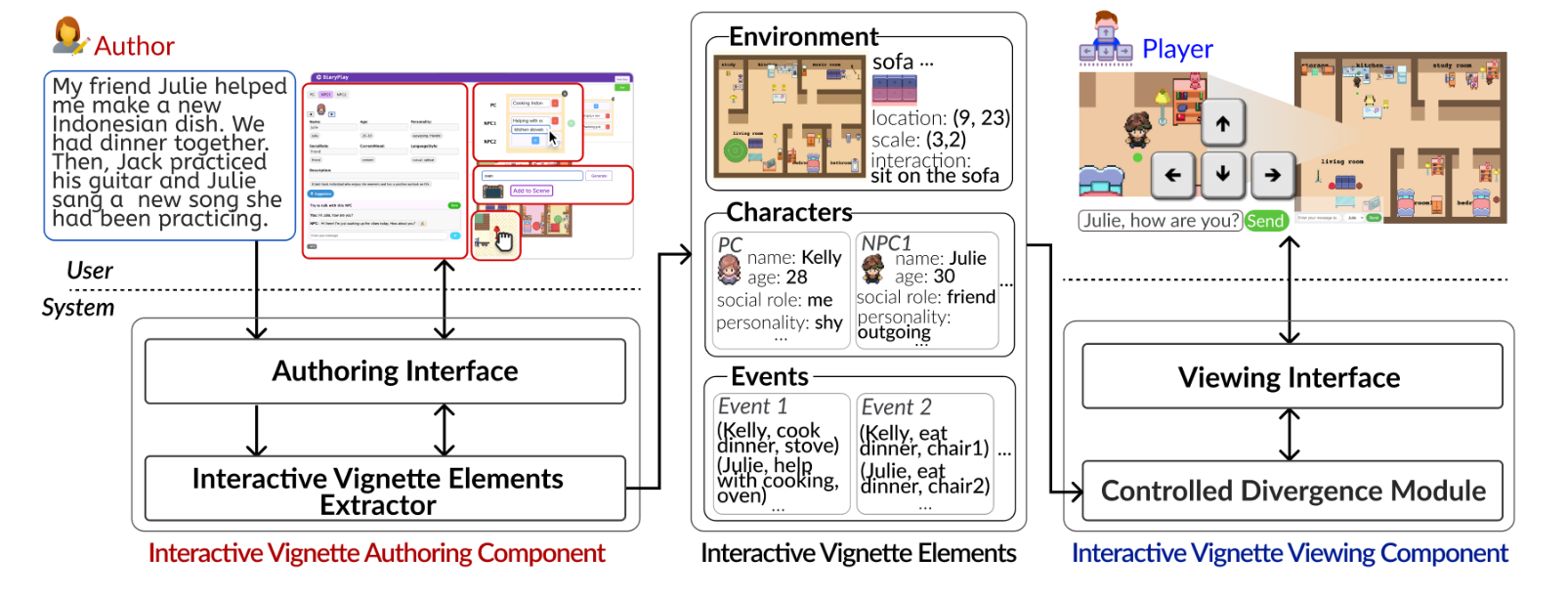
Figure 3: DiaryPlay system overview.
Steps in the Authoring Scenario
To support lightweight authoring (DG1) and ensure the capture of the author's core story message (DG2), the Interactive Vignette Authoring Component guides everyday storytellers in completing and refining interactive vignette elements by surfacing gaps between the natural-language story input and the information required for an interactive vignette.
To enable lightweight authoring (DG1) while still capturing the main story message (DG2), we designed a minimal but sufficient specification for everyday storytelling regarding each of the three core elements: environment, characters, and events.
Step 1
Input a story
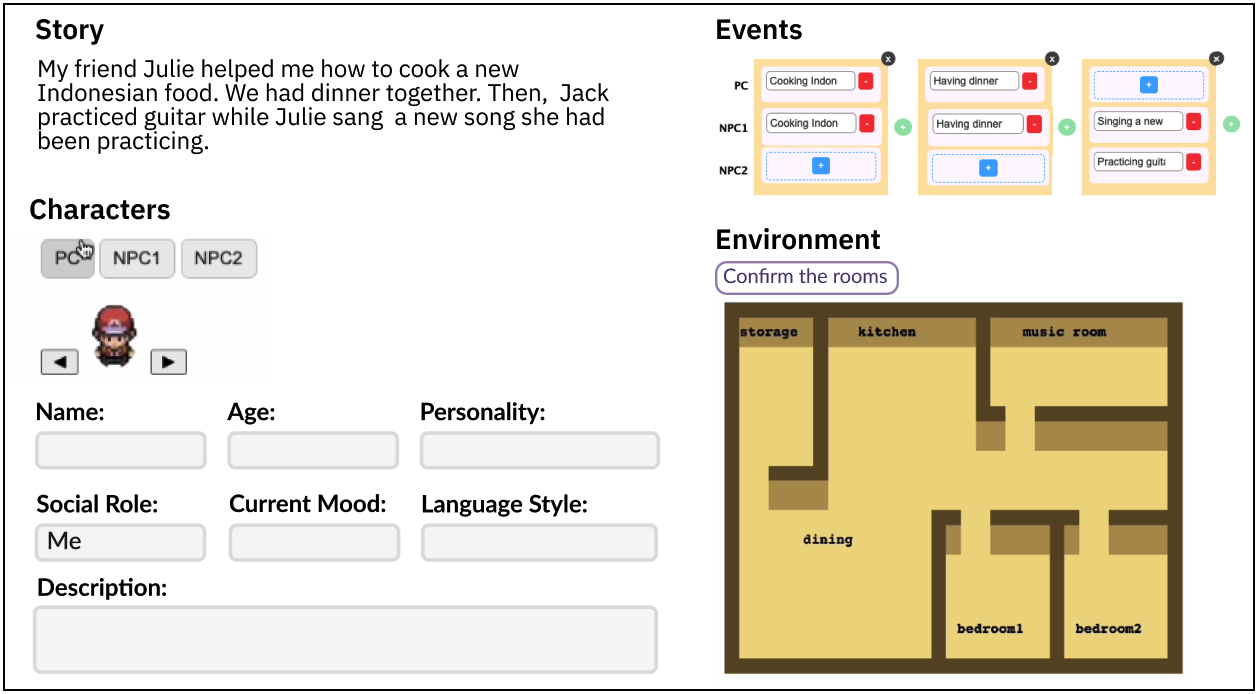
Kelly begins by entering an everyday story into the story input box: "My friend Julie helped me make a new Indonesian dish. We had dinner together. Then, Jack practiced his guitar while Julie sang a new song she had been practicing."
The Interactive Vignette Elements Extractor takes the author's input story and initially extracts three elements - environment, characters, and events - and presents them in the corresponding panels on the Authoring Interface, where the author can review, complete, and modify them with system guidance.
Step 2
Label rooms
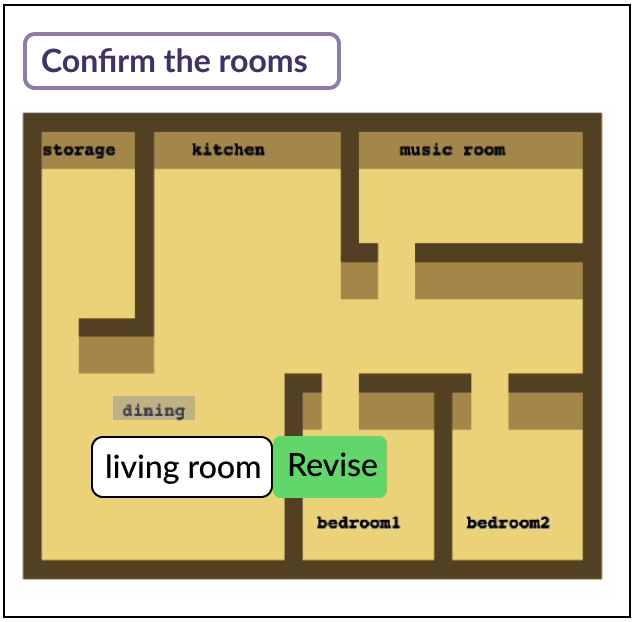
To first define the environment layout, the extractor uses the LLM to pair the input story with one of the layouts and then labels each room based on its functionality to support the story input, asking the author for review and revision.
Kelly begins with the Environment panel, revises the "dining" label to "living room" to better align with her intended setup, and then clicks the "Confirm the rooms" button to continue.
Step 3
Place objects
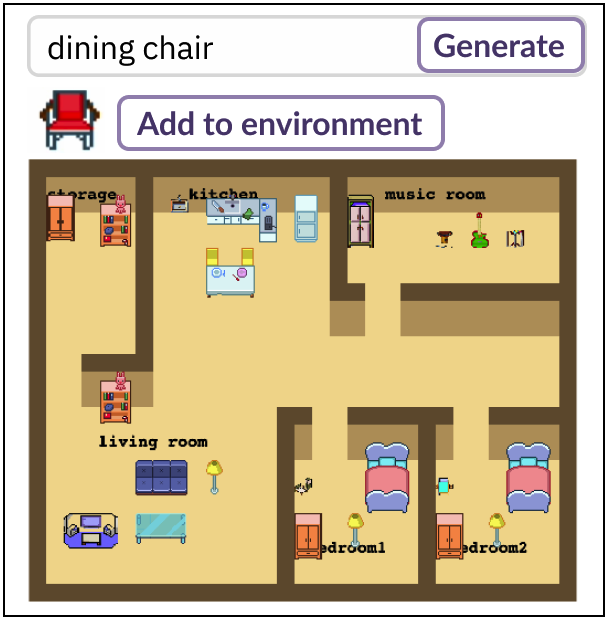
Once the author confirms the layout and room labels, the extractor automatically calculates and populates each room with necessary objects - either event-related or environment-related - and adds decorative objects when there is room, while using semantic reasoning and path-finding to keep the space navigable.
Kelly customizes the result by dragging objects, removing a carpet, and adding a missing dining chair in the kitchen. Once the population of the rooms is complete, the author can add, remove, or relocate objects.
Step 4
Complete the character profiles
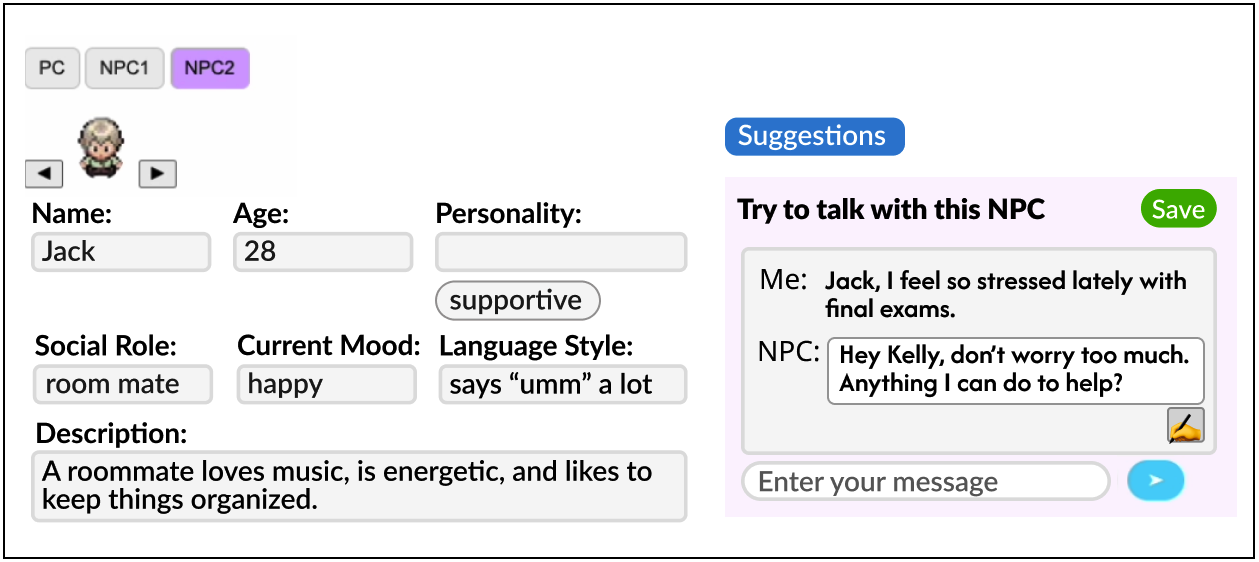
Based on the story, the extractor identifies the main character as the PC and classifies all other characters as NPCs. For each character, the system extracts explicitly stated persona attributes such as names and social roles, while leaving unspecified traits blank for the author to complete so that the system does not over-guide the author.
When Kelly struggles to articulate Jack's personality, she uses the conversation-simulation feature. The system generates NPC replies based on the character's current persona traits, conversation examples, and the story context, then recommends persona traits by comparing the dialogue against the current persona traits and proposing revisions and new traits implied by the dialogue.
Step 5
Refine the events with object assignment
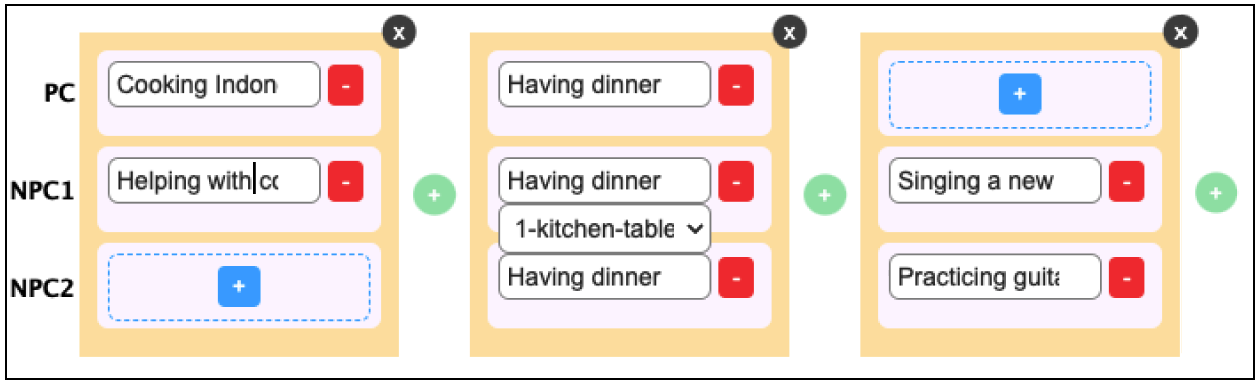
For events, the extractor first prompts the LLM to list the actions performed by each character and match them to the most appropriate objects, thereby creating the (character, action, object) tuple. It then groups simultaneous activities into a single key event and organizes the key events into a time-ordered sequence.
Kelly reviews the visual timeline and notices that the event generated from "We had dinner" included only Julie and her, even though it should have included Jack too. She corrects the missing activity, then reviews the target objects for each activity through the system's automatic assignments and drop-down object list.
Steps in the Viewing Scenario
To enable adaptive player interactions (DG3) without requiring authors to manually construct branching paths (DG1), the Interactive Vignette Viewing Component automatically delivers branching interactive narratives based on the authored elements.
We adopt a branch-and-bottleneck narrative structure so that divergent player interactions converge back into the author's predefined key events, thereby preserving the author's intended story message (DG2).
Step 1
Read the caption
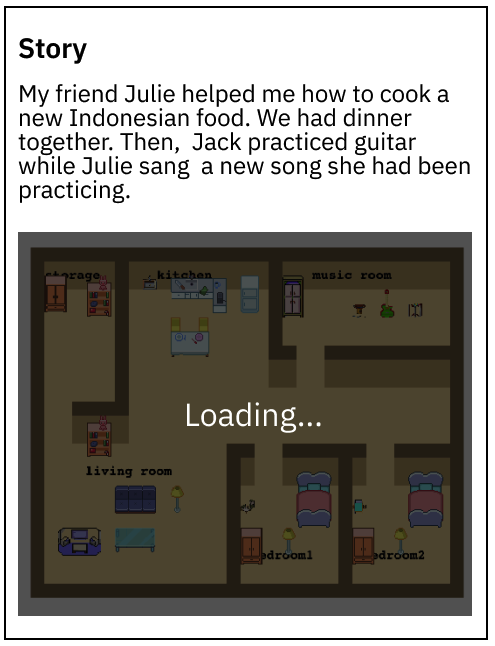
Bob starts by reading the text story as a caption to get an overview of the characters and events.
He realizes that he will role-play as Kelly (the PC) and interact with two other characters, Julie and Jack (NPCs).
Step 2
Engage with the first key event
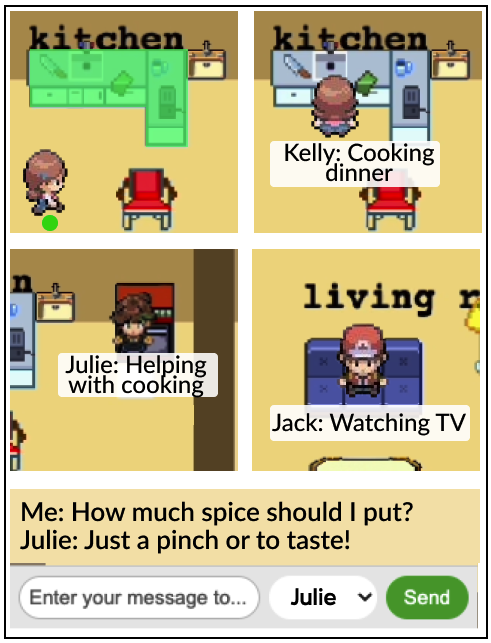
As the interactive vignette loads, Bob notices the kitchen stove top glowing, signaling that an activity is about to take place at the stove. To trigger the activity, he uses the arrow keys to move the PC toward it. Upon approaching, the activity starts.
Bob sees the glow disappear, and a speech bubble appears under the PC's avatar to show the PC's activity: "Cooking dinner." Bob then observes Julie moving in the kitchen, and her speech bubble reads: "Helping with cooking." Although the text story does not specify Jack's activity during the cooking, Bob notices that Jack is sitting on the sofa and watching TV rather than remaining idle, giving Bob a sense of character liveliness.
Step 3
Diverge from the key events
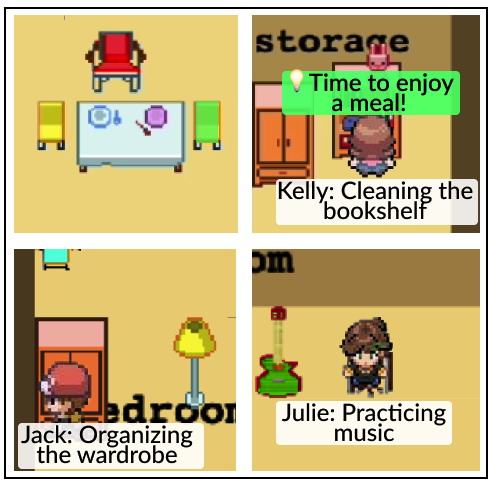
After the cooking event is done, Bob sees the chair glowing, signaling the transition to the next key event, having dinner. However, instead of moving the PC to the glowing chair immediately, Bob decides to explore the home environment further.
He moves the PC to the storage room and triggers the activity "Cleaning the bookshelf" at the bookshelf. Bob realizes Jack and Julie are not abandoning the PC to have dinner without Kelly. Instead, Bob observes that Jack is "Organizing the wardrobe," Julie is "Practicing music," a subtle inner voice says "Time to enjoy a meal!", and Jack responds to "I want to skip dinner" by guiding the PC toward the next key event.
Step 4
Return to the main storyline
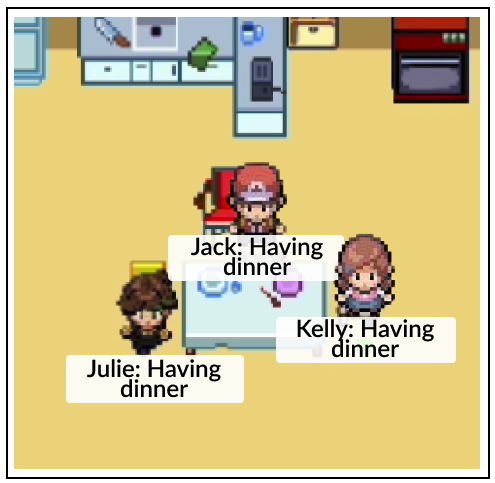
Following the inner voice and Jack's response, Bob decides to move the PC to the glowing dining chair.
After the PC arrives at the dining chair, Bob sees Jack and Julie join the PC for dinner.
Step 5
Complete the interactive vignette experience
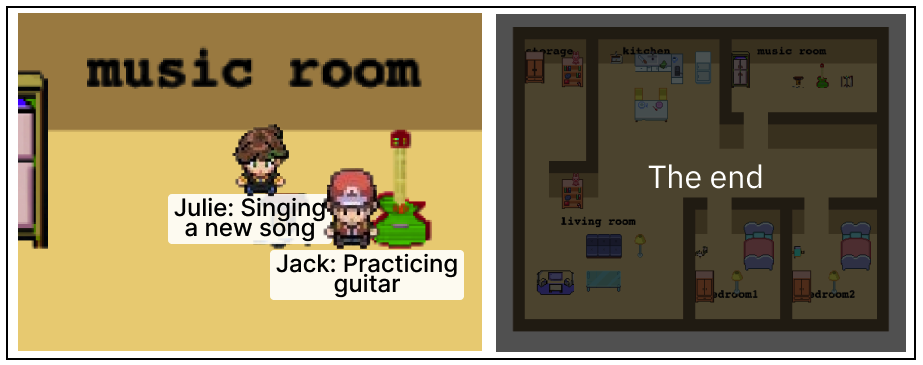
After the "Having dinner" event, Bob notices Jack and Julie moving to the music room to practice guitar and singing. With no more glowing objects in the environment, Bob realizes he is free to move the PC, interacting with the characters and objects in the environment.
After Jack and Julie complete their guitar practice and singing, Bob sees the end screen, marking the conclusion of the experience.
Controlled Divergence Module
During the interactive vignette play time, the Controlled Divergence (CD) Module automatically transforms the single-branch sequence of events in the specification into a branch-and-bottleneck narrative structure reacting to player interactions. Its purpose is to allow both the PC and the NPCs to freely take divergent activities while being subtly guided to stay within the controlled boundaries defined by the storyline from the author.
From the interactive vignette author's perspective, the CD Module offloads the manual effort of crafting a multi-branch narrative. From the player's perspective, it provides player agency within the viewing experience.
Real-time responses
The CD Module must provide real-time responses to ensure an immersive and coherent narrative experience.
Subtle PC guidance
The CD Module should provide subtle PC guidance toward the key events when they diverge, to preserve the author-intended storyline.
Believable NPC behavior
The CD Module should ensure believable NPCs that behave consistently with their personas and the overarching story logic.
Stage 1: Plan NPC activities. To ensure real-time responsiveness despite the computational delay from activity generation, the CD Module plans NPC activities in advance. For each NPC, it generates two next-activity plans based on the NPC's persona and the storyline: one for when the PC follows the next key event and another for when the PC engages in a divergent activity.
Stage 2: React to PC activities. The module continuously monitors PC activities and selects the planned NPC activity depending on whether the PC took the activity defined in the next key event. Once the NPC begins the planned action, the module returns to Stage 1 to plan the next activity.
The CD Module also detects the PC's deviation from key events and guides the player back to the flow of the story through two mechanisms: inner voice and chat-based guidance from the NPCs. Instead of forcing players back to the key event, the system uses inner-voice cues and dialogue to nudge players, while allowing divergent activities to continue as long as needed without a fixed limit.
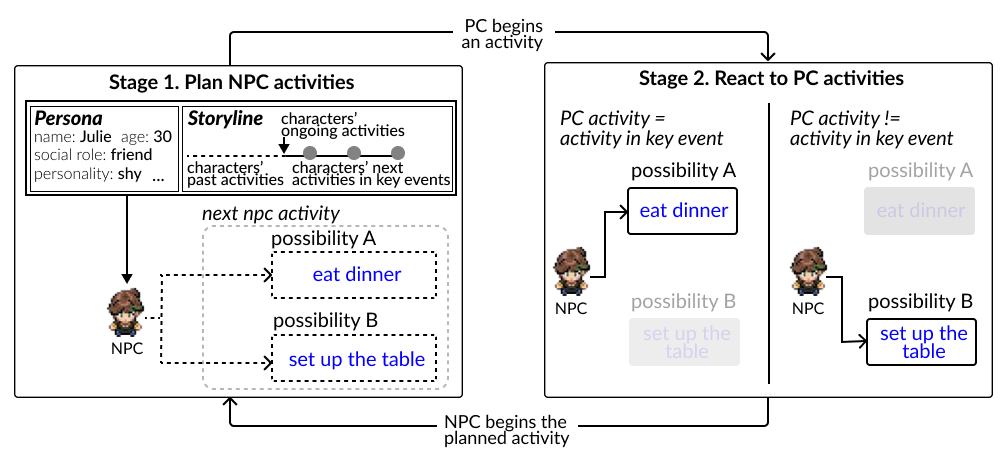
Figure 8: The CD Module plans NPC activities and reacts to PC activities in a two-stage loop.
Results from the User Study
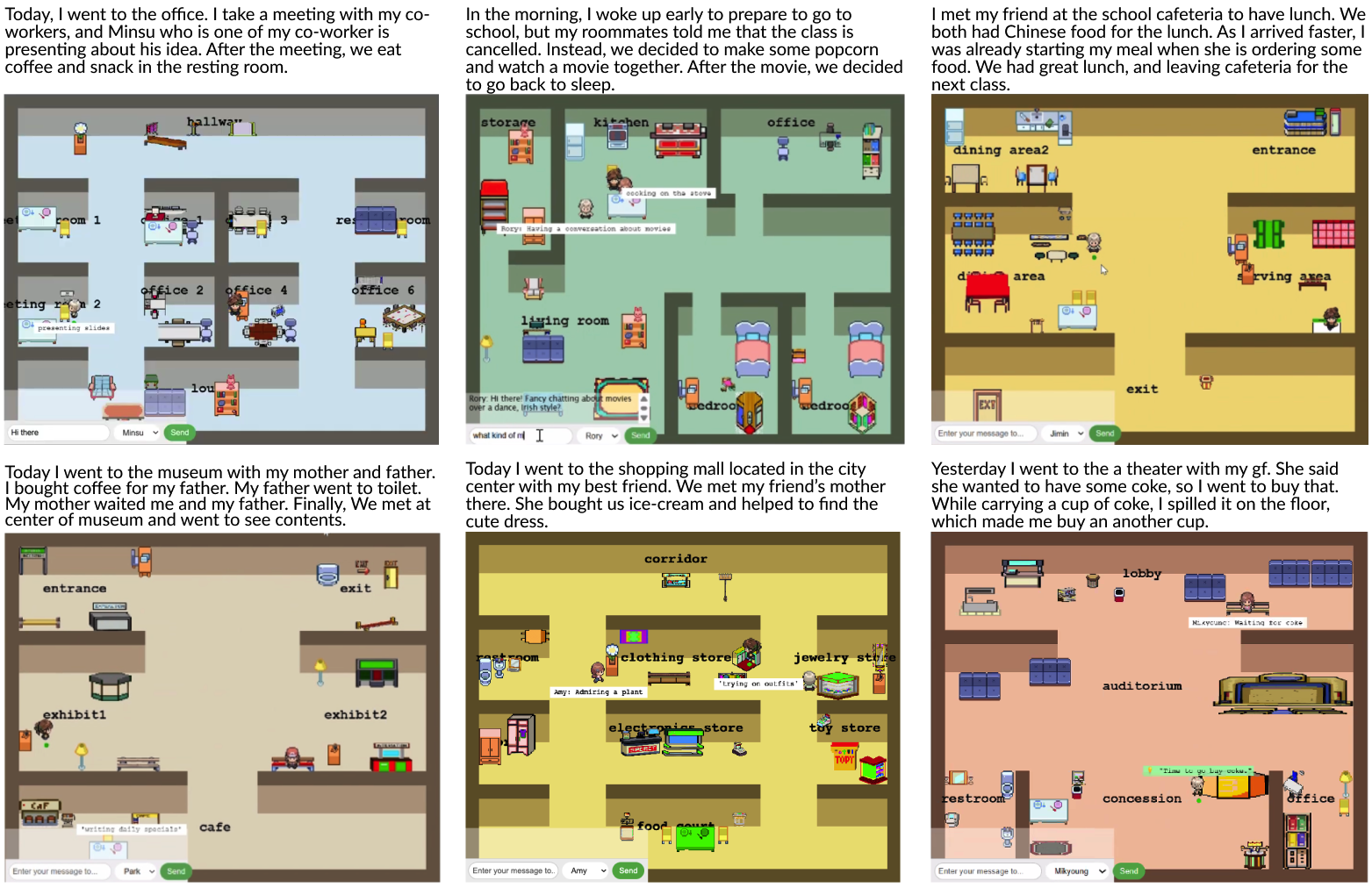
Figure 9: Example interactive vignettes created by participants from the user study. Minor grammatical errors in the original stories have been revised for illustration.
As illustrated in Figure 9, participants used DiaryPlay to express a wide variety of stories, spanning across various locations (e.g., office, library, museum, home, theater, shopping mall), characters (e.g., family members, friends, colleagues, strangers, classmates), and types of events (e.g., work day, school morning routine, museum visit). This demonstrates DiaryPlay’s capability to support diverse expressions of everyday stories.
The authoring experience met participants’ expectations for lightweight effort; they were able to complete interactive vignette creation within 20 minutes, and DiaryPlay provided effective assistance in building interactive vignette elements. Participants also valued the moments when players diverged from the main storyline, bringing in tiny yet meaningful pieces that enriched but did not derail their everyday story. Meanwhile, participants described the viewing experience as engaging and immersive, and they were able to understand the author’s main story content despite divergent interactions.
Citation
BibTeX
@inproceedings{10.1145/3772318.3790572,
  author = {Xu, Jiangnan and Cha, Haeseul and Choi, Gosu and Lee, Gyu-cheol and Yoon, Yeo-Jin and Lee, Zucheul and Papangelis, Konstantinos and Kim, Dae Hyun and Kim, Juho},
  title = {DiaryPlay: AI-Assisted Creation of Interactive Story Vignettes for Everyday Storytelling},
  year = {2026},
  isbn = {979-8-4007-2278-3},
  publisher = {Association for Computing Machinery},
  address = {New York, NY, USA},
  url = {https://doi.org/10.1145/3772318.3790572},
  doi = {10.1145/3772318.3790572},
  booktitle = {Proceedings of the 2026 CHI Conference on Human Factors in Computing Systems},
  numpages = {21},
  location = {Barcelona, Spain},
  series = {CHI '26}
}